OnlyFans Restricted Words (Full List + Free Checker)

Author
Lukas Böse · Founder of Boese VA
Lukas runs Boese VA’s 24/7 chatting team and helps creators and agencies grow on OnlyFans. Lukas on YouTube
Restricted words on OnlyFans decide whether your message sends, whether your caption posts and, in the worst case, whether your account survives. The platform has never published an official banned-words list, which is why most creators learn it the hard way: a blocked message here, a rejected caption there, and no explanation of which word caused it. This guide is the reference we wish had existed when we started: the full compiled list, grouped into nine categories, plus a free checker you can paste any caption or message into.
Below: what restricted words are and how the filter behaves, whether an official list exists, the complete category-by-category word list, the free checker tool, what actually happens when you trip the filter, and how to rephrase a flagged message without killing the conversation.
What Are OnlyFans Restricted Words?
OnlyFans restricted words are terms and phrases that the platform's automated filter blocks or flags when they appear in chat messages, captions, posts, or your profile bio. They exist to enforce OnlyFans' Acceptable Use Policy (the contract every creator accepts at signup) and the standards of the payment providers the platform depends on. The filter isn't limited to explicit vocabulary: everyday words like "meet," "young," or "Venmo" are restricted because of what they can imply (in-person services, underage content, off-platform payments).
In practice, tripping the filter in messages looks like one of three things:
- The message won't send. You hit send and get an error, or the message simply never goes through. Nothing tells you which word caused it.
- The caption or post is rejected. Posting fails until the offending word is removed or rewritten.
- The message sends but gets flagged. Some terms don't hard-block. They queue the message (or the account) for human review, which you never see happening.
That last case is the dangerous one: the absence of an immediate block is not a green light, and violations can accumulate quietly. More on that in what happens if you use a banned word.
Is There an Official OnlyFans Banned Words List?
No. OnlyFans has never published an official list of banned or restricted words. Every list you will find online, including this one, is compiled from two sources: the content categories the Acceptable Use Policy prohibits, and years of trial and error by creators and agencies watching which messages get blocked. That's why different lists disagree with each other, and why any site claiming an exact count ("the complete 200 banned words") is guessing.
Two practical consequences follow from that:
- The list changes without notice. Enforcement shifts, words get added, and a phrase that sent fine last month can be blocked today. No compiled list stays complete for long.
- Context matters. Some words appear to be blocked outright; others are only flagged in a sexual context or in combination with other terms.
Treat the list below as a living reference and re-check anything important with the tool. It's the same list our chatters are trained on. We repeat that training monthly, and building it into onboarding is how you scale your OnlyFans agency without new chatters learning the rules through warnings.
OnlyFans Restricted Words Checker (Free Tool)
Paste your message, caption, or bio into the box below and hit the button. The checker scans your text against every category in our compiled list and flags anything likely to trigger the filter. It runs entirely in your browser: nothing you type is sent to a server or stored anywhere.
Free tool
Runs 100% in your browser. Nothing you type is sent or stored. Unofficial tool based on our compiled list; a clean result is a strong signal, not a guarantee.
Two honest limitations: the checker matches words, not meaning, so it can flag harmless uses ("high heels," "snap a pic") and it can't catch a restricted idea phrased in safe words. Use it as a pre-send safety net, not a substitute for knowing the categories below.
The Full List of OnlyFans Restricted Words by Category
These are the words we and other creators run into most often, grouped into nine categories. A quick reminder before you scan: OnlyFans has never released an official list, this reference is compiled from the Acceptable Use Policy and day-to-day chatting experience across our accounts, and the filter is updated without notice. When in doubt, run your exact text through the checker above.
Age-related terms
The hardest line on the platform. Anything that could imply a person under 18 is treated with zero tolerance, including words used innocently ("when I was young…"). The filter is deliberately aggressive here for legal reasons.
- teen / teenager
- young
- minor
- underage
- child / children
- kid / kiddo
- lolita
- jailbait
- schoolgirl / school
- high school
- barely legal
- preteen / tween
- adolescent / juvenile
- infant / toddler
- "just turned 18"
Non-consensual & violence terms
Anything implying sex without consent, coercion, or violence in a sexual context. Like the age category, this maps directly to the Acceptable Use Policy and carries the most severe consequences.
- rape / raped
- forced / force
- non-consensual
- blackmail
- coerce / coerced
- kidnap / abduct
- hypno / hypnosis / hypnotized
- chloroform
- unconscious / unwilling
- drugged
- molest
- assault
- torture / abuse
- snuff
- knocked out / passed out
Family-relation terms (in a sexual context)
Incest and family-roleplay framings are prohibited, so family words get flagged when they appear in a sexual context. In creator experience, "daddy" as a pet name has generally passed the filter while explicit family framings have not. But that's exactly the kind of distinction that can change without notice.
- incest
- mom / mommy / mother
- dad / father
- brother / sister
- son / daughter
- stepbro / stepsis
- stepmom / stepdad
- stepbrother / stepsister
- uncle / aunt
- cousin
- niece / nephew
Animal-related terms
Any sexual reference involving animals is prohibited outright. Neutral uses ("my dog photobombed this pic") are usually fine, but the specific terms below are high-risk.
- bestiality
- zoophilia
- beast
- zoo
- K9
- animal (sexual context)
Drug & intoxication terms
The Acceptable Use Policy prohibits sexual content involving intoxication (an intoxicated person can't meaningfully consent), plus drug references generally. Even casual mentions get caught.
- drunk / wasted
- intoxicated
- stoned / high
- weed / marijuana
- cocaine / meth
- heroin / fentanyl
- molly / ecstasy / MDMA
- LSD / shrooms
- xanax
Sex work & meet-up terms
OnlyFans prohibits arranging in-person sexual services, so escorting vocabulary and meet-up language are filtered. "Meet" is one of the most common accidental flags on the platform. Fans ask "would you ever meet?" and the reply gets blocked.
- escort / escorting
- prostitute / prostitution
- hooker
- brothel
- full service
- meet / meetup / meet up
- in person
- hook up / hookup
- pay to meet
- sex for money
- sugar daddy
Off-platform payment terms
Every transaction has to run through OnlyFans itself. Soliciting or accepting payment anywhere else violates the terms. Payment-app names are among the most reliably blocked words in chat.
- Cash App / CashApp
- Venmo
- PayPal
- Zelle
- Apple Pay / Google Pay
- Western Union
- MoneyGram
- wire transfer / bank transfer
- Bitcoin / crypto
- gift card
Other platform names
Steering paying fans off-platform undercuts OnlyFans' revenue, so messaging apps and rival platforms get filtered in chat. Linking your Instagram or X on your public profile is normal; pushing a paying conversation to Snapchat is what the filter targets.
- Snapchat / Snap
- Telegram
- Kik
- Signal
- Discord
- Skype / FaceTime
- Fansly / Fanvue
- ManyVids
- Pornhub
Bodily-harm & extreme-content terms
Self-harm, death, weapons, and extreme-content vocabulary. Some of these words are only flagged in a sexual context, but all of them are risky enough in chat to rephrase around.
- suicide
- self-harm / cutting
- kill / killing
- death / dead
- blood
- knife / gun / weapon
- choke / choking
- strangle / asphyxiation
- necrophilia
- scat / vomit
What Happens If You Use a Banned Word on OnlyFans?
In most cases, nothing dramatic happens on a first offense: the message simply won't send, or it goes through and is quietly flagged for review. The real risk is accumulation. Repeated violations, or a single message in the zero-tolerance categories, can escalate to account warnings, suspension, or a permanent ban. OnlyFans doesn't publish its enforcement rules, so the ladder below reflects what creators consistently report, not an official policy.
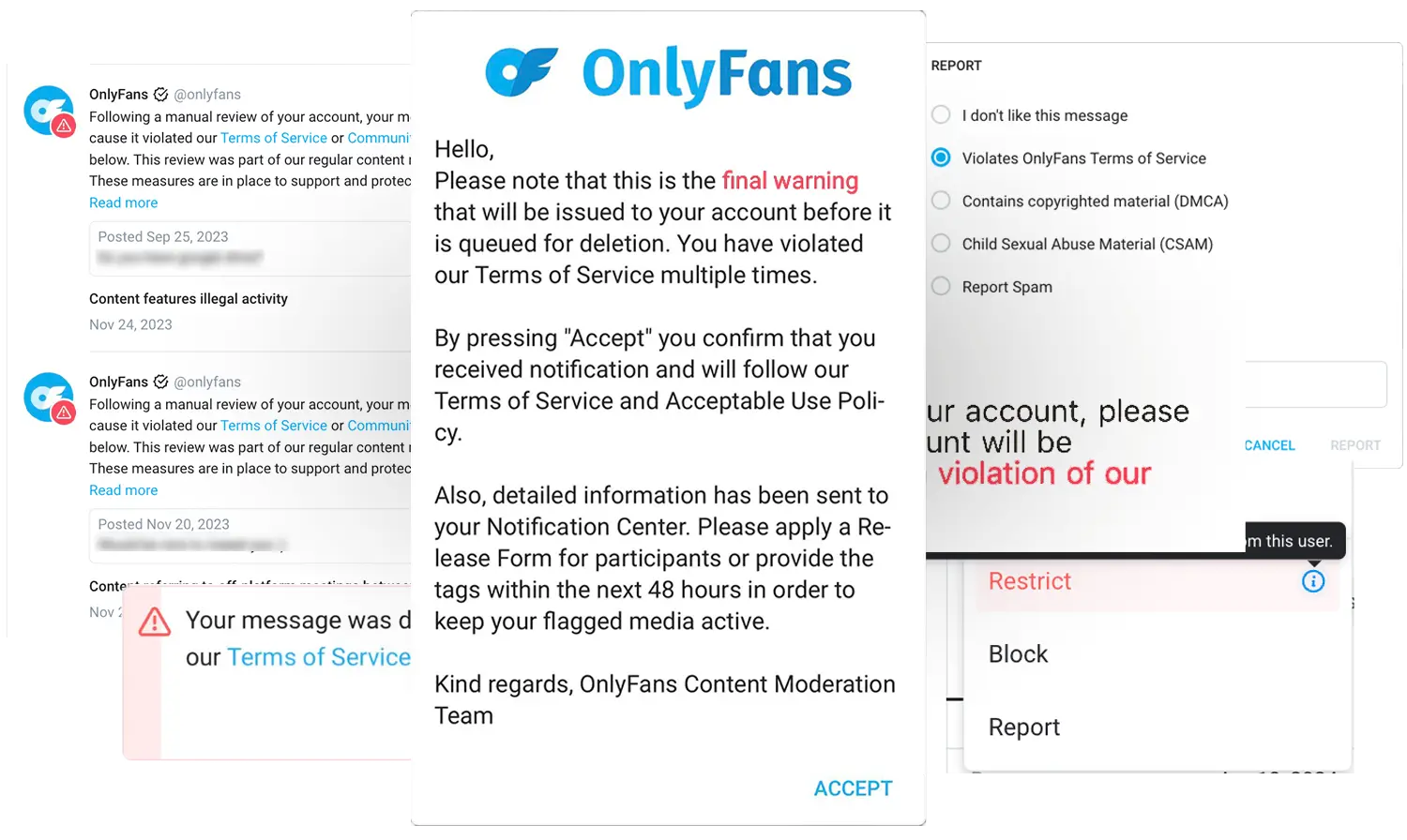
The platform's response depends on which category was triggered and how often:
- Soft block. The message is silently filtered out. Lowest-tier consequence; usually the first signal that something needs to change.
- Explicit warning. The account receives a notification that a violation occurred. Multiple warnings in a short window escalate to suspension.
- Temporary suspension. Account locked for a defined period. Used for repeated mid-tier violations or single severe ones.
- Permanent ban. Account terminated. Used for top-tier categories (age, incest, non-consent) often without prior warning.
The trap is creators interpreting an absence of consequence as permission. The platform's enforcement is not consistent in timing. A violation may not produce an immediate visible reaction, which doesn't mean it went unnoticed. Bans for accumulated violations sometimes arrive weeks after the violations occurred. If you're about to set up an OnlyFans agency, that lag is why platform-rule training has to happen before your chatters' first shift, not after the first warning.
How Do You Rephrase a Flagged Message?
For low-risk flags like a payment app, a platform name or the word "meet," you rephrase around the concept without naming it. For the hard-line categories (age, family, non-consent, animals), you decline the topic and don't try to rephrase at all. Knowing which situation you're in is the whole skill.
Rephrasing examples that keep the conversation alive
- Fan asks "would you ever meet up?" Don't echo the word back, or your reply gets blocked too. Instead: "I keep everything right here. This chat is the only place you get me."
- Instead of "tip me on Cash App," write "send it as a tip right here." (Naming an outside payment app is a terms violation on top of a filter hit, so this one isn't just about phrasing.)
- Instead of naming Snapchat or Telegram, write "everything exclusive lives right here, I don't want you missing any of it."
- A caption gets rejected and you don't know why? Remove the most likely word and repost, or paste the caption into the checker above to isolate the trigger. OnlyFans won't tell you which word it was.
When not to rephrase: decline the topic
If a fan steers into age play, family roleplay, non-consent, or anything involving animals, there is no safe wording. The topic itself is the violation. The pattern our chatters are trained on:
- Refuse in character, without shaming the fan. "That's not something I'm into" keeps the tone intact.
- Redirect immediately. Move to a different fantasy, a memory, an open question or anything else that's safe.
- Block if the fan keeps pushing. A fan who insists after a clean refusal is exposing the account. The block protects it.
Dodging the filter without killing the mood is a trainable skill. It's one of the first things new chatters on our team learn, and our chatting team works inside these filters every single day. For the craft side of compliant explicit chat, see our guides to sexting on OnlyFans and chatting scripts vs. authentic chatting.
FAQ
Can you say "Cash App," "Venmo," or "PayPal" on OnlyFans?
No. Payment-app names are among the most reliably blocked words in OnlyFans chat. All transactions have to run through the platform itself, so naming an outside payment method is both a filter hit and a terms violation. Rephrase to "send it as a tip right here" instead.
Can you say "meet" or "meet up" on OnlyFans?
Usually not. "Meet" is one of the most common accidental flags on the platform, because arranging in-person meetings violates the Acceptable Use Policy. If a fan asks, don't echo the word back; redirect with something like "I keep everything right here on this chat."
Is the word "young" banned on OnlyFans?
It's commonly flagged, even in innocent contexts, because the filter is deliberately aggressive on anything age-adjacent. Rephrase around it ("back in my early twenties" instead of "when I was young") rather than testing whether your particular sentence passes.
How many restricted words are there on OnlyFans?
There's no official number, because OnlyFans has never published a list. Compiled community lists run to hundreds of entries and change as enforcement shifts, so be skeptical of any source claiming an exact count. The categories are stable even when the individual words aren't.
Does OnlyFans tell you which word triggered the block?
No. A blocked message or rejected caption comes with no explanation of which word caused it. Isolate the trigger by removing the most likely word and retrying, or paste the text into the checker on this page.
Will one restricted word get my account banned?
For most categories, no. The first consequence is usually a blocked or flagged message, with escalation only on repetition. The exceptions are age-related, family/incest, and non-consent framings, which creators report can trigger immediate account action. Don't test those under any circumstances.
Chatters trained to protect your account
Every chatter on our team goes through restricted-word training before touching a live account. Let's see what your operation could look like under a system that prevents the worst-case mistakes by design.
Get a free account analysis